
Spot the Pattern Before Something Breaks: the Timeline View in the Asset Record File
Published on 29.07.2026
WAKU Care
WE EMPOWER UPTIME HEROES
Your Software Platform that keeps machines running.
A technician gets a work order. Error code E247, conveyor line 03, hall B. No further details. He opens the CMMS: a Work Order entry from three weeks ago, no comment, no context. The error codes from the machine are stored in the controller, which he can't access from his phone. The notes from the colleague who handled it last time are somewhere in an email thread.
He drives out. Looks around. Replaces a component. Drives back. Three weeks later: error code E247, conveyor line 03, hall B.
The problem isn't the error. The problem is the missing memory.
What costs maintenance teams the most time isn't repairing. It's searching for context.
The Hidden Cost of Missing Context
Error data in the machine controller. Cases in the CMMS. Work Orders in another module. Paper logs in a binder next to the machine. Email threads between shift supervisors. In most facilities, all relevant information about an asset exists somewhere. But it's spread across so many systems and formats that nobody ever sees the full picture.
According to research from Accenture, maintenance technicians spend on average more than 20 percent of their working time searching for relevant information before they can even begin a repair. That's one-fifth of total work capacity, spent not on fixing the actual problem, but on finding context.
Even more damaging: without historical context, the same failures get treated the same way every time. The symptom gets fixed, the root cause stays hidden. Recurring breakdowns are often not a sign of a broken machine. They're a sign of a system that can't see patterns.
Everything on One Timeline
The Timeline View in the Asset Record File solves exactly this problem. It brings all events related to an asset onto a single, chronological timeline: error codes, Cases, and Work Orders. Everything in one place. Everything clickable. Everything carrying the full context behind it.
That sounds simple, because it is. And that was the point.
This feature wasn't built in a lab. It was developed because customers like GXO and Dexory reported exactly this blind spot in their daily work: too many systems, too little connection, too much time spent searching instead of solving. The Timeline View is the direct response to that feedback.
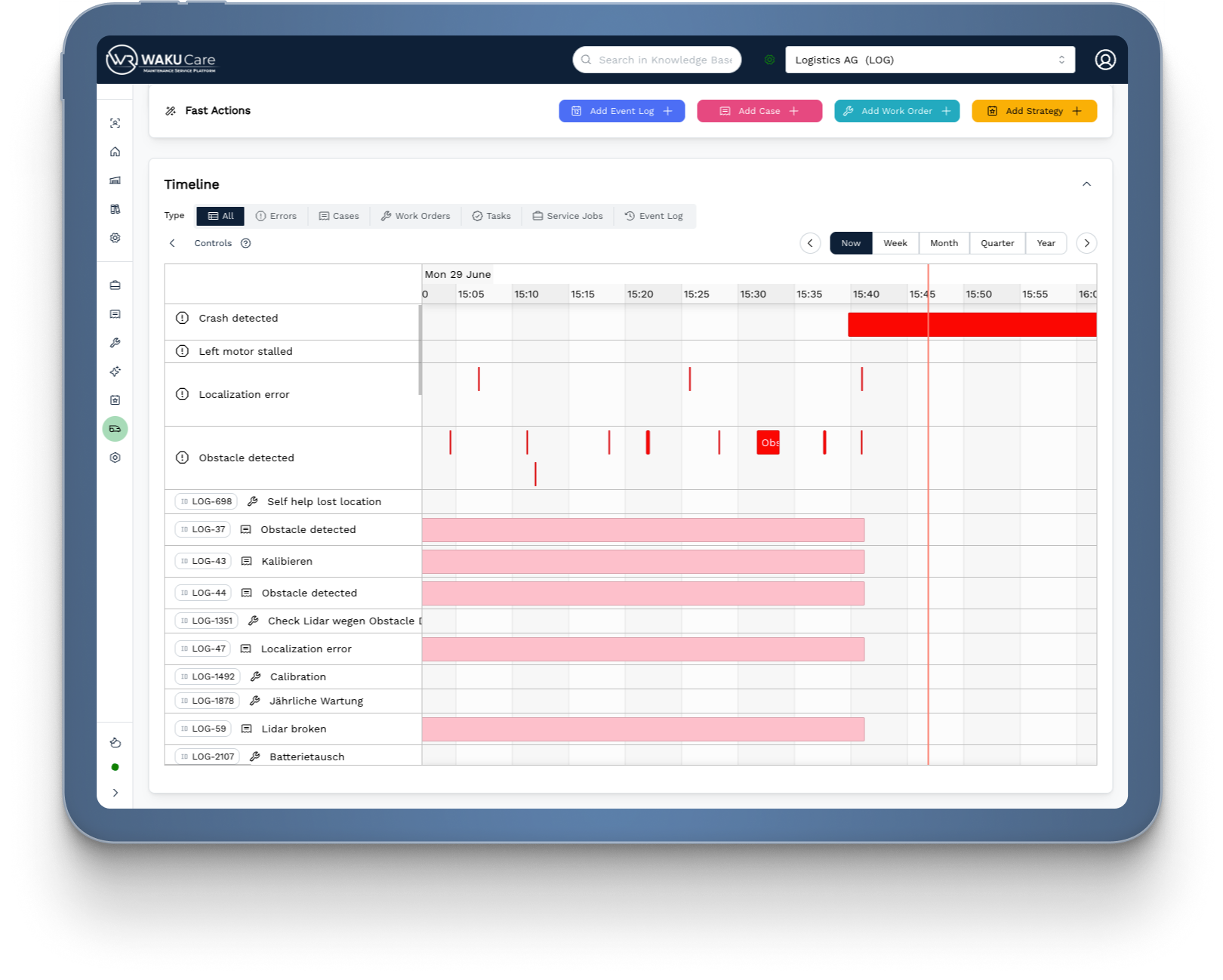
For the technician, this means: before driving out to a machine, they can see at a glance what happened over the past weeks and months. Which error codes appeared. Which Cases were opened. Which Work Orders were completed. And most importantly: in what order.
For decision makers, it means assets can be compared at a glance. Which machine is generating a disproportionate number of Cases? Where do error codes keep reappearing without a lasting fix? These are questions that previously required hours of manual analysis.
Patterns That Were Invisible Before
The real value of the Timeline View isn't in displaying data. It's in revealing connections.
Once error codes, Cases, and Work Orders are visible on a shared timeline, patterns emerge that were previously lost in the noise of separate systems.
A concrete example: a specific error code keeps appearing, consistently two to three weeks before the machine fails unexpectedly. Without the Timeline View, every alert looks isolated. With it, the connection is visible at a glance. The error code isn't random noise. It's an early warning signal.
Another example: a Work Order was marked complete, but the same error code appeared four days later. Was the root cause actually fixed? The Timeline immediately shows that too little time passed between the action and the next error to call it a lasting solution. This is the kind of insight that was previously buried across different systems.
For decision makers, this opens up a new perspective on the entire asset fleet. Which assets cause disproportionately many problems? Which maintenance actions actually have a lasting effect, and which are just temporary fixes? Answers to these questions are now available without manual analysis.
Start Now: What's Possible Immediately
The best thing about the Timeline View is that it requires no separate setup. Every Asset Record File in WAKU Care already contains the Timeline. As soon as an error code is received, a Case is created, or a Work Order is completed, the entry automatically appears on the relevant asset's timeline.
No manual data maintenance. No integrations that need to be configured first. The Timeline grows on its own with every event.
For teams already using WAKU Care: open the Asset Record File of any asset that's been causing recurring issues. Scroll through the last six months. What do you see?
For teams getting started: the Asset Record File is the central hub for every machine in WAKU Care. It combines master data, operational history, attached documents, and the Timeline in a single view. No more switching between systems.
From Archive to Early Warning System
The Asset Record File with its Timeline View changes how teams work with machines. Not because it's more complex than previous solutions, but because it's simpler. Context is no longer the privilege of whoever has worked at the facility longest and keeps everything in their head. It's accessible to anyone who opens the asset record.
That's the first step toward predictive maintenance: seeing patterns before they become failures.
In the next article in this series, we'll show what happens when a technician marks an anomaly directly in the Operational Data Charts, and a fully contextualized Case is created in seconds.
Want to see the Timeline View in action? Request a demo directly.
Request a demo →
All Articles in the Series
Previous Articles
Article 01 — The hidden costs of reactive maintenance
Next Articles
Article 03 — From Data Point to Ticket in Seconds — Marking Anomalies Directly in the Operational Data Charts (link coming soon)
Article 04 — Closed-Loop Maintenance — From Sensor Signal to Solution Proposal Without Manual Intervention (link coming soon)
Article 05 — AI That Thinks Like an Experienced Technician — IMA as a Smart Assistant in the Closed Loop (link coming soon)
Article 06 — Predictive Maintenance in 30 Days — How Teams Get Started with WAKU Care Without a Major IT Project (link coming soon)
WAKU Robotics supports you in choosing the right robot for your application. We take care of the procurement of the robots as well as the on-site test. Our WAKU Care software helps you to operate the robots across manufacturers and to analyze the processes.
Contact WAKU